SOP-to-Skill icon

SOP-to-Skill

AI-Powered · General Workflow

Turn Enterprise Workflows into Installable Skills

Bring SOPs, systems, and role know-how onto one execution path

Turn SOPs, systems, templates, and role know-how into installable skills for Codex, Claude Code, and other AI tools so work starts with executable context instead of repeated explanation.

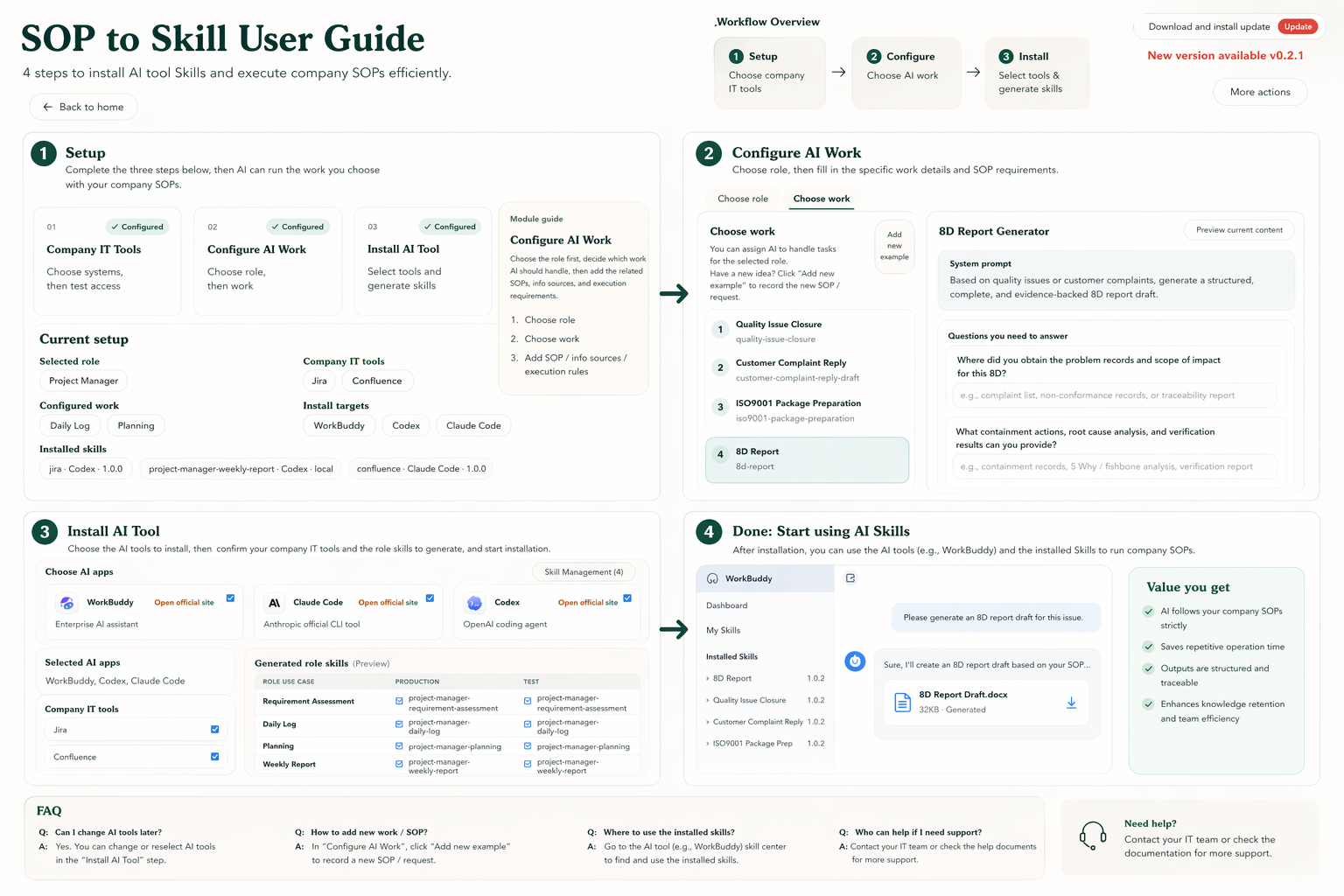
Desktop workflow overview
SOP to Skill English desktop user guide

Product Preview

See how the product connects workflow to skills

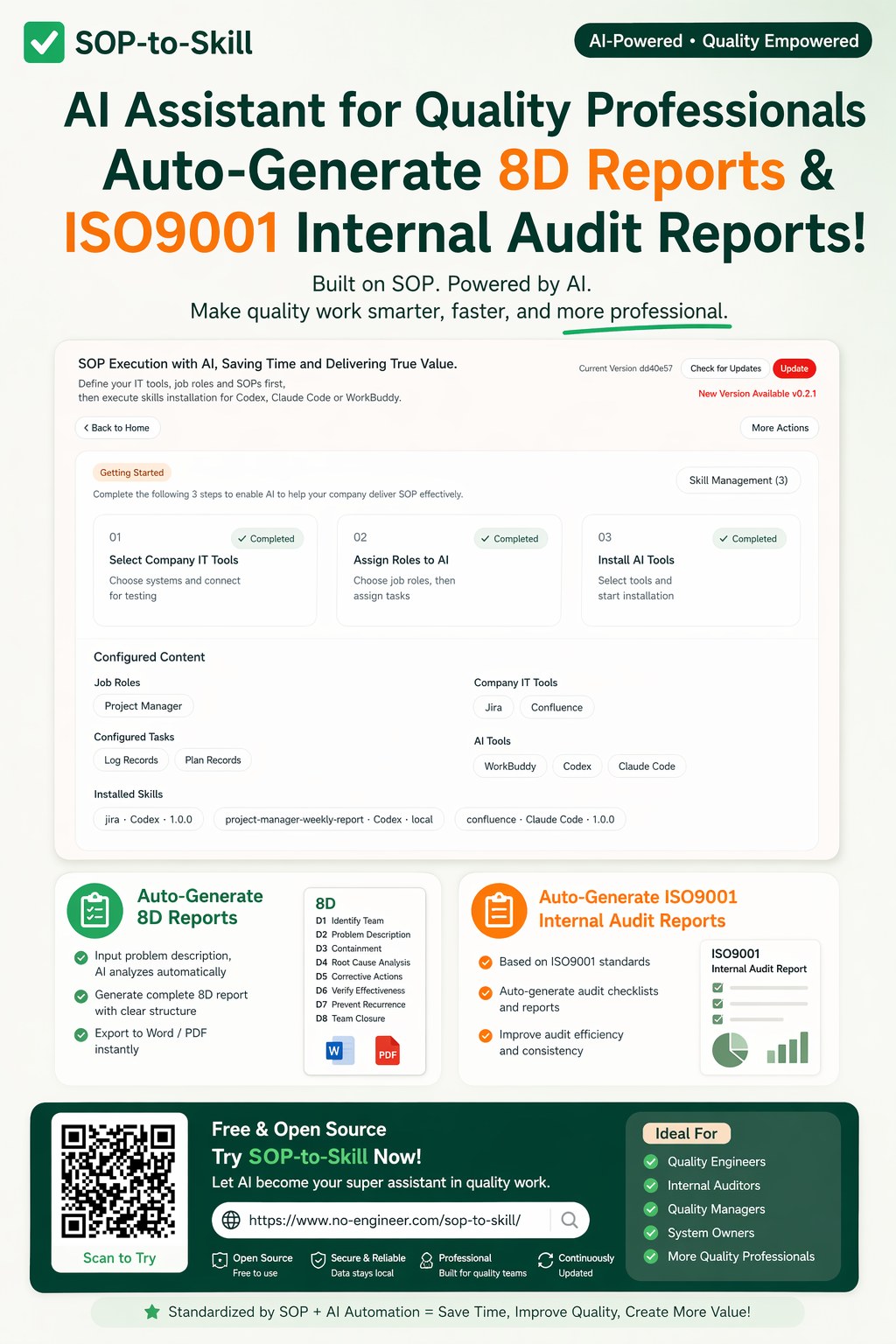
Use the desktop guide to understand the full setup flow, then the mobile visual for sharing and download entry.

Desktop workflow overview
SOP to Skill English desktop user guide
Mobile poster
SOP to Skill English mobile poster

Enterprise Pain Points

Why enterprise AI often struggles to become real workflow

The real enterprise bottleneck is usually not the model. It is scattered context, fragmented rules, and role knowledge that never reaches the AI tool.

01

Context Is Scattered

Enterprise AI stalls early when the working context is scattered and never becomes one executable input.

  • Chat, email, spreadsheets, and old docs live in different tools
  • Teams struggle to rebuild one usable working context
  • AI rarely receives the full picture up front

02

Role Knowledge Does Not Reuse Well

Role experience does not reliably become reusable organizational capability, so teams keep reteaching the same work.

  • Role know-how stays trapped in personal habits
  • Handoffs lose the reasoning behind good work
  • New people start without a stable working frame

03

Tools Are Still Disconnected

The missing piece is an installable work interface that connects enterprise rules and AI execution.

  • SOPs, systems, templates, and AI tools stay disconnected
  • Rules do not flow into real execution entry points
  • Methods remain static documentation

04

People Keep Starting from Blank Prompts

Work keeps starting from blank prompts instead of a reusable structure that already knows the job.

  • People keep rewriting background and constraints
  • Time is lost in repeated explanation
  • Execution rarely starts from a stable context

How It Works

From organizing assets to running real tasks

This product is not a one-off prompt page. It connects enterprise assets, employee execution, and AI tools into a working loop.

01

Connect Enterprise Assets

The first step is to connect enterprise assets so AI can read the same context people already work with.

  • Collect SOPs, templates, system notes, and examples
  • Turn scattered material into AI-readable context
  • Start with real enterprise inputs instead of synthetic prompts

02

Generate Skills

Role methods and organizational rules become skills that can be installed, maintained, and reused.

  • Organize capabilities by role, rule, and source
  • Generate installable and maintainable skills
  • Move methods out of static documentation

03

Use Them Inside AI Tools

Skills should live inside real AI tools so the workflow actually starts with usable context.

  • Use them in Codex, Claude Code, and related tools
  • Support real execution instead of demo-only flows
  • Reduce repeated background writing

04

Improve Through Real Tasks

The workflow improves through real execution as better examples and judgments flow back into the skill itself.

  • Let real tasks expose missing context
  • Feed strong prompts and outputs back into the system
  • Keep the method improving through use

Applied Scenario

Start with the general method, then go deeper

The main page explains the general workflow first, then routes you into concrete role scenarios. QA is one of the clearest production-ready entry points today.

QA / Quality Scenario

If your immediate need is quality issue analysis, 8D reporting, or ISO9001 internal audits, jump straight into the QA scenario page for a narrower explanation.

Open QA Scenario

General Workflow · Applied Scenarios · Continuous Improvement

Put Skills into Real Work First

Connect enterprise assets to execution first, then let strong methods flow back into the skill system. Start with the general workflow, then move into the concrete scenario you need.

Typical starting scenarios

  • Project operations
  • Quality / QA
  • IT / Ops
  • Cross-team workflows